
Documentation
Chat
On this page
TL;DR
Chat → new session → Target devices + optional Workflow → type and send. Supports Chat mode and AI refinement mode.
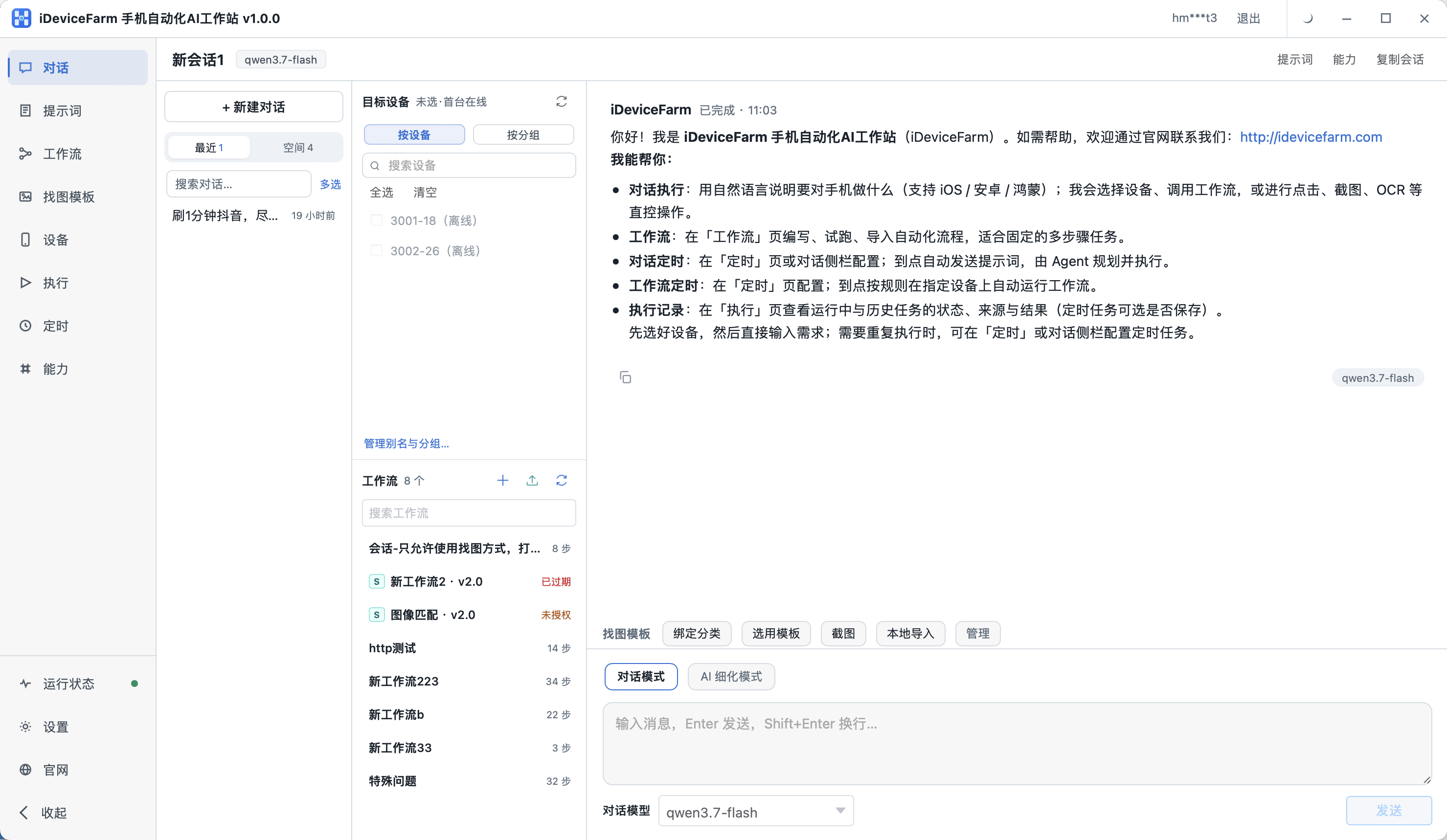
Layout
| Area | Purpose |
|---|---|
| Left nav | Chat, Prompts, Workflows, etc. |
| Sessions | New / switch chats, grouped spaces |
| Target devices | By device or by group |
| Workflows | Quick-pick templates |
| Main pane | AI interaction and execution |
| Input bar | Model, mode, send |
New chat
- + New chat
- Select at least one online device
- (Optional) Bind a workflow
- Describe the task and Send
Chat mode vs AI refinement mode
Both modes are switched on the Chat page. The difference is whether you refine the requirement with AI first before running it on the phone.
Chat mode
Best when the task is already clear: type natural language and AI plans and executes immediately (open apps, tap, screenshot, OCR, etc.).
AI refinement mode
Best when you only have a vague idea and the steps are not clear yet:
- Describe the vague goal — tell AI what you want the phone to do in plain language; you do not need every step upfront
- Multi-turn chat and follow-ups — AI asks about screens, order, edge cases; you fill in the details
- Refine into executable steps — after a few rounds, AI turns the requirement into clear step-by-step text ready to run
- Send to execute — run that refined text in chat; AI follows the explicit steps on the device, which is usually more accurate than sending a fuzzy one-liner
When to use refinement mode
Multi-step tasks, complex UIs, or when you are not sure “tap what first, then what”—turn on AI refinement mode, refine first, then execute. Simple tasks (e.g. “open Settings and wait 3 seconds”) can stay in Chat mode.
You can save refined text to Prompts and reuse it for similar tasks later.
Built-in capabilities
- Trigger workflows
- Use image templates
- Atomic ops: open app, tap, swipe, screenshot, OCR, etc.
Workstation welcome also mentions scheduled chat/workflow (Schedule) and Execution history.
Prerequisites
Device must be online on Devices. If automation environment is missing, finish endpoint install section 4.